• Skip to main content
  • Skip to primary sidebar

Web Development Archive

  • Archive
You are here: Home / Archives for Other

Other

Pagination

Component

import { Component, OnInit } from '@angular/core';
import { MovieService } from '../movies.service';
import { BehaviorSubject, combineLatest } from 'rxjs';
import { map } from 'rxjs/operators';
import { CommonModule } from '@angular/common';

@Component({
  selector: 'app-pagination',
  templateUrl: './pagination.component.html',
  styleUrls: ['./pagination.component.scss'],
  standalone: true,
  imports: [CommonModule],
})
export class PaginationComponent implements OnInit {
  constructor(private readonly movieService: MovieService) {}
  items$ = this.movieService.getAllMovies$();

  currentPage$ = new BehaviorSubject<number>(1);
  itemsPerPage = 4;

  displayedItems$ = combineLatest([this.items$, this.currentPage$]).pipe(
    map(([items, currentPage]) => items.slice((currentPage - 1) * this.itemsPerPage, currentPage * this.itemsPerPage))
  );

  totalItems: number;

  get totalPages(): number {
    return Math.ceil(this.totalItems / this.itemsPerPage);
  }

  previousPage(): void {
    this.currentPage$.next(this.currentPage$.value - 1);
  }

  nextPage(): void {
    this.currentPage$.next(this.currentPage$.value + 1);
  }

  ngOnInit(): void {
    this.items$.subscribe((items) => {
      this.totalItems = items.length;
    });
  }
}

Template

<h2>Movies</h2>
<div class="movies grid-4">
  <div class="card" *ngFor="let item of displayedItems$ | async">
    <img class="card-img-top" [src]="item.image" [alt]="item.title" />
    <h4 class="card-header">{{ item.title }}</h4>
    <ul class="list-group list-group-flush">
      <li class="list-group-item">Year: {{ item.year }}</li>
      <li class="list-group-item">Genre: {{ item.genre }}</li>
      <li class="list-group-item">IMDb Rating: {{ item.imdb }}</li>
    </ul>
    <div class="card-footer"></div>
  </div>
</div>

<div *ngIf="totalItems > itemsPerPage" class="pagination">
  <button [disabled]="currentPage$.value === 1" (click)="previousPage()">Previous</button>
  <button [disabled]="currentPage$.value === totalPages" (click)="nextPage()">Next</button>
</div>

A pagináció hozzáadásához szükség lesz néhány módosításra az alkalmazásban. Az alábbiakban felsorolom a lépéseket, amiket meg kell tenni:

  1. Változók hozzáadása a MoviesComponent-hez:
  • currentPage: az aktuális oldal száma
  • itemsPerPage: hány elem jelenjen meg egy oldalon
  • totalItems: a teljes filmek száma (opcionális, de hasznos a navigációhoz)
  1. Szűrő funkció az items$ streamhez, hogy csak a kiválasztott oldal elemeit mutassa.
  2. Navigációs gombok hozzáadása az oldal aljára/elére, hogy a felhasználók lapozhassanak.

Lássuk, hogyan nézhet ki ez:

1. Változók hozzáadása:

currentPage = 1;
itemsPerPage = 4;
totalItems: number;

ngOnInit() {
  // Eltároljuk a teljes filmek számát
  this.items$.subscribe(items => {
    this.totalItems = items.length;
  });
}

2. Items$ szűrése:

Mielőtt az items$-t használnánk az Angular template-ben, szűrnünk kell rajta, hogy csak a megfelelő oldal filmjeit mutassa. A slice metódust használhatjuk erre:

displayedItems$ = this.items$.pipe(
  map(items => items.slice((this.currentPage - 1) * this.itemsPerPage, this.currentPage * this.itemsPerPage))
);

A template-ben pedig cseréljük le items$-t displayedItems$-re.

3. Navigációs gombok:

<div *ngIf="totalItems > itemsPerPage" class="pagination">
  <button [disabled]="currentPage === 1" (click)="previousPage()">Previous</button>
  <button [disabled]="currentPage === (totalItems / itemsPerPage)" (click)="nextPage()">Next</button>
</div>

A komponensben:

previousPage(): void {
  if (this.currentPage > 1) {
    this.currentPage--;
  }
}

nextPage(): void {
  if (this.currentPage < this.totalItems / this.itemsPerPage) {
    this.currentPage++;
  }
}

Filed Under: Other

Sort Pipe – Filter repetations

Ismétlődések eltávolítása

<option *ngFor="let item of items$ | async | sortYears : 'year'">{{ item.year }}</option>
import { Pipe, PipeTransform } from '@angular/core';

@Pipe({
  name: 'sortYears',
  standalone: true,
})
export class SortYearsPipe implements PipeTransform {
  transform(array: any[] | null, field: string): any[] {
    if (!array) {
      return [];
    }

    // Először rendezzük az évszámokat.
    array.sort((a: any, b: any) => {
      if (a[field] < b[field]) {
        return -1;
      } else if (a[field] > b[field]) {
        return 1;
      } else {
        return 0;
      }
    });

    // Most eltávolítjuk az ismétlődéseket.
    return array.filter((value, index, self) => index === self.findIndex((t) => t[field] === value[field]));
  }
}

Filed Under: Other

Calculator

Filed Under: Other

OrderBy Pipe

ng g p orderby --skip-import

Pipe

import { Pipe, PipeTransform } from '@angular/core';

@Pipe({
  name: 'orderBy',
  standalone: true,
})
export class OrderByPipe implements PipeTransform {
  transform(array: any[], direction = 'asc', field?: string): any[] {
    if (!Array.isArray(array)) {
      return array;
    }

    let sortedArray: any[] = [];

    if (field) {
      // Ha van mező (field) megadva
      sortedArray = array.sort((a, b) => (a[field] > b[field] ? 1 : -1));
    } else {
      sortedArray = array.sort(); // Ha nincs mező megadva, egyszerűen rendezzük az elemeket
    }

    if (direction === 'desc') {
      return sortedArray.reverse();
    }
    return sortedArray;
  }
}

Component

import { CommonModule } from '@angular/common';
import { Component } from '@angular/core';
import { OrderByPipe } from 'src/app/pipes/orderby.pipe';

@Component({
  standalone: true,
  imports: [OrderByPipe, CommonModule],
  selector: 'app-pipe',
  templateUrl: './pipe.component.html',
  styleUrls: ['./pipe.component.scss'],
})
export class PipeComponent {
  itemsArray1 = ['Banana', 'Apple', 'Orange', 'Strawberry', 'Blueberry', 'Raspberry', 'Ananas', 'Avocado'];
  itemsArray2 = ['Banana', 'Apple', 'Orange', 'Strawberry', 'Blueberry', 'Raspberry', 'Ananas', 'Avocado'];
  itemsArray3 = ['Banana', 'Apple', 'Orange', 'Strawberry', 'Blueberry', 'Raspberry', 'Ananas', 'Avocado'];
}
<h2>OrderBy</h2>
    <article class="grid-3">
      <div>
        <h3>Rendezettlen tömb</h3>
        <ul class="list-group">
          <li class="list-group-item" *ngFor="let item of itemsArray1">{{ item }}</li>
        </ul>
      </div>
      <div>
        <h3>Növekvő sorrend</h3>

        <ul class="list-group">
          <li class="list-group-item" *ngFor="let item of itemsArray2 | orderBy : 'asc'">{{ item }}</li>
        </ul>
      </div>

      <div>
        <h3>Csökkenő sorrend</h3>

        <ul class="list-group">
          <li class="list-group-item" *ngFor="let item of itemsArray3 | orderBy : 'desc'">{{ item }}</li>
        </ul>
      </div>
    </article>

Filed Under: Other

Summary Pipe

ng g p summary --skip-import

Pipe

import { Pipe, PipeTransform } from '@angular/core';

@Pipe({
  name: 'summary',
  standalone: true,
})
export class SummaryPipe implements PipeTransform {
  transform(value: string): string {
    if (!value) {
      return value; // If the input is empty, return it as is
    }

    if (value.length <= 60) {
      return value; // If the input is already 30 characters or less, return it as is
    }

    return value.substring(0, 60) + '...'; // Return the substring of the input with ellipsis
  }
}

Component

import { Component } from '@angular/core';
import { SummaryPipe } from 'src/app/pipes/summary.pipe';

@Component({
  standalone: true,
  imports: [SummaryPipe],
  selector: 'app-pipe',
  templateUrl: './pipe.component.html',
  styleUrls: ['./pipe.component.scss'],
})
export class PipeComponent {
  text =
    'Lorem ipsum dolor sit amet, consectetur adipiscing elit. Sed a ante auctor, ' +
    'dictum massa in, consectetur massa. Nam est lorem, elementum a blandit id, sagittis ' +
    'eget ante. Sed tempus mauris a massa blandit, id vehicula nibh lobortis. Fusce in ' +
    'accumsan dui. Pellentesque sit amet mi ut lectus sodales lobortis. Nulla lacinia ' +
    'rhoncus egestas. Nam fermentum metus est, at placerat dolor tempus in. ';

}
<p>{{ text | summary }}</p>

Filed Under: Other

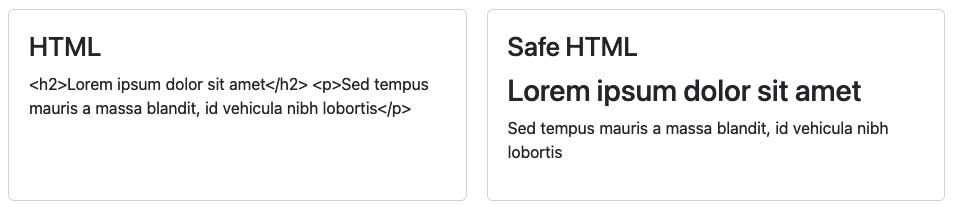
Safe HTML Pipe

ng g p safe-html --skip-import

Pipe

import { Pipe, PipeTransform } from '@angular/core';
import { DomSanitizer, SafeHtml } from '@angular/platform-browser';

@Pipe({
  name: 'safeHtml',
  standalone: true,
})
export class SafeHtmlPipe implements PipeTransform {
  constructor(private readonly sanitizer: DomSanitizer) {}

  transform(value: string): SafeHtml {
    return this.sanitizer.bypassSecurityTrustHtml(value);
  }
}

Component

<div [innerHTML]="htmlString | safeHtml"></div>
import { Component } from '@angular/core';
import { SafeHtmlPipe } from 'src/app/pipes/safe-html.pipe';

@Component({
  standalone: true,
  imports: [SafeHtmlPipe],
  selector: 'app-pipe',
  templateUrl: './pipe.component.html',
  styleUrls: ['./pipe.component.scss'],
})
export class PipeComponent {
  htmlString = `<h2>Lorem ipsum dolor sit amet</h2>
    <p>Sed tempus mauris a massa blandit, id vehicula nibh lobortis</p>`;
}

Filed Under: Other

AOS in Angular

npm install aos --save
npm i --save-dev @types/aos

angular.json / styles array

"node_modules/aos/dist/aos.css"
import * as AOS from 'aos';
ngOnInit(): void {
    AOS.init();
}
<app-component data-aos="fade-up" data-aos-duration="3000"></app-component>

Filed Under: Other

ng-deep

Overwrite component’s default css in another component:

::ng-deep {
  .footer {
    background: black !important
  }
}

Filed Under: Other

Grid Tiles – Colspan / Rowspan

<section class="tiles">
  <div class="wrapper grid-container">
    <img class="grid-item" src="assets/images/hero/hero-1.jpg" alt="" />
    <img class="grid-item" src="assets/images/hero/hero-2.jpg" alt="" />
    <img class="grid-item" src="assets/images/hero/hero-3.jpg" alt="" />
    <img class="grid-item" src="assets/images/hero/hero-4.jpg" alt="" />
  </div>
</section>
.tiles {
  margin: 30px 0;
  .grid-container {
    display: grid;
    grid-gap: 20px;
    grid-template-columns: repeat(3, 1fr);
  }
  .grid-item {
    min-height: 200px;
    height: 100%;
    img {
      object-fit: cover;
    }
  }
  .grid-item:nth-child(1) {
    grid-column: 1 / 2;
  }
  .grid-item:nth-child(4) {
    grid-row: 2 / 3;
  }
  .grid-item:nth-child(1) {
    grid-row: 1 / 3;
  }
  .grid-item:nth-child(4) {
    grid-column: 2 / 4;
  }
}

Filed Under: Other

Stop Auto P in Angular

Az Angular alapértelmezés szerint nem értelmezi a HTML tageket a string-ekben, hanem biztonsági okokból szövegként jeleníti meg őket. Ez védelmet biztosít a káros szkriptek, mint a Cross Site Scripting (XSS) ellen.

Azonban, ha meg szeretnéd jeleníteni a HTML-t, amit egy stringben tárolsz, akkor a [innerHTML] direktívát használhatod. Az [innerHTML] direktíva a komponensben lévő stringben található HTML-t értelmezi és megjeleníti.

A fenti példához hasonlóan:

<div [innerHTML]="testimonial.name"></div>

Ez egy nagyon erőteljes eszköz, de nagyon óvatosan kell vele bánni. Mivel ez a direktíva értelmezi a HTML-t, ezért lehetővé teszi a szkriptek futtatását is. Ezért csak akkor használd, ha teljesen biztos vagy abban, hogy a stringben tárolt HTML biztonságos.

Filed Under: Other

  • « Go to Previous Page
  • Page 1
  • Interim pages omitted …
  • Page 5
  • Page 6
  • Page 7
  • Page 8
  • Page 9
  • Interim pages omitted …
  • Page 11
  • Go to Next Page »

Primary Sidebar

  • angular.io
© 2026 WP Flames - All Right Reserved