• Skip to main content
  • Skip to primary sidebar

Web Development Archive

  • Archive
You are here: Home / Archives for Angular

Angular

Auth Guard Example

import { inject } from '@angular/core';
import { CanActivateFn, Router, ActivatedRouteSnapshot } from '@angular/router';
import { AuthService } from './auth.service';

export const authGuard: CanActivateFn = async (
route: ActivatedRouteSnapshot
) => {
const authService = inject(AuthService);
const router = inject(Router);

const isLoggedIn = await authService.getIsLoggedIn();

const isAuthPage =
route.routeConfig?.path === 'login' ||
route.routeConfig?.path === 'registration';

if (isLoggedIn && isAuthPage) {
router.navigate(['/']);
return false;
}

if (!isLoggedIn && !isAuthPage) {
router.navigate(['/login']);
return false;
}

return true;
};

Routing with lazy loading and auth guards

import { Routes } from '@angular/router';
import { authGuard } from './auth/auth.guard';

export const appRoutes: Routes = [
{
path: '',
children: [
{
path: '',
redirectTo: 'cases',
pathMatch: 'full',
},
{
path: 'cases',
canActivate: [authGuard], // Csak bejelentkezett felhasználóknak elérhető
loadComponent: () =>
import('./features/cases/cases.component').then(
(m) => m.CasesComponent
),
},
{
path: 'login',
canActivate: [authGuard], // Ha be vagy jelentkezve, átirányít a főoldalra
loadComponent: () =>
import('./auth/login/login.component').then((m) => m.LoginComponent),
},
{
path: 'registration',
canActivate: [authGuard], // Ha be vagy jelentkezve, átirányít a főoldalra
loadComponent: () =>
import('./auth/registration/registration.component').then(
(m) => m.RegistrationComponent
),
},
{
path: '404',
loadComponent: () =>
import('./core/not-found/not-found.component').then(
(m) => m.NotFoundComponent
),
},
{
path: '**',
redirectTo: '404',
},
],
},
];
Filed Under: Angular

Fix CORS error with proxy

proxy.config.json

{
"/api": {
"target": "https://your-api-endpoint.com",
"secure": true,
"changeOrigin": true
}
}

angular.json

"serve": {
"options": {
"proxyConfig": "proxy.config.json"
},
},

environment.ts

export const environment = {
baseUrl: '/api',
};

Filed Under: Angular

Environment

export const environment = {
baseUrl: 'https://your-endpoint.net/api'
};

auth.service

private readonly BASE_URL = `${environment.baseUrl}/auth`;

Filed Under: Angular

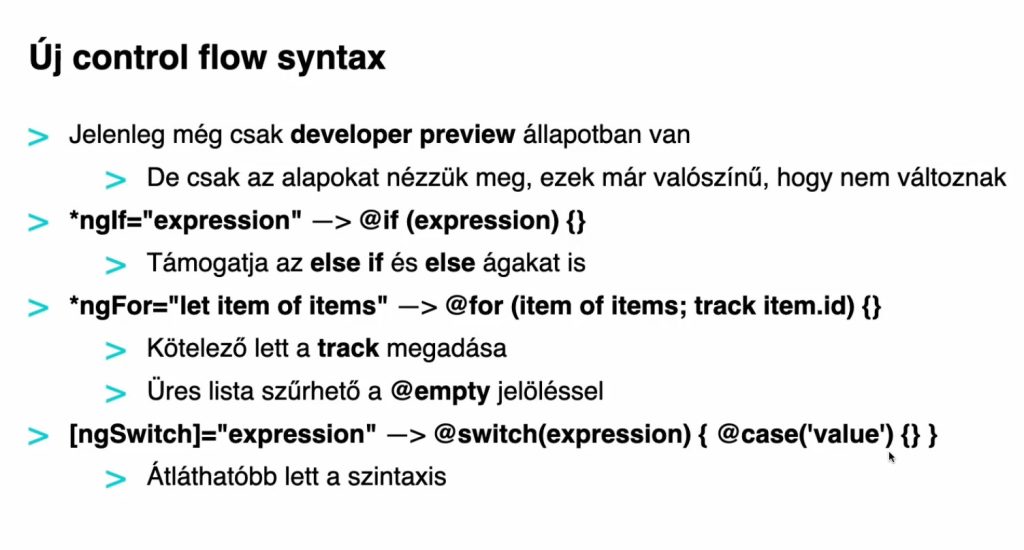
Angular new syntax @for, @if, @switch

Filed Under: Angular

Angular Signal Example

@Input() messageSignal: Signal<string> = signal('Alapértelmezett üzenet');

Parent component

A szülő komponens signal-t használ az adatok átadására a gyermek komponens felé.

import { Component, signal } from '@angular/core';
import { ChildComponent } from '../child/child.component';

@Component({
selector: 'app-parent',
standalone: true,
imports: [ChildComponent],
templateUrl: './parent.component.html',
styleUrl: './parent.component.scss'
})
export class ParentComponent {
parentMessage = signal('Message from parent (Signal)');

}
<h2>Parent component</h2>
<app-child [messageSignal]="parentMessage"/>

Child component

A gyermek komponens fogadja a signal-t az @Input({ required: true }) segítségével.

import { Component, Input, Signal } from '@angular/core';

@Component({
selector: 'app-child',
standalone: true,
imports: [],
templateUrl: './child.component.html',
styleUrl: './child.component.scss'
})
export class ChildComponent {
@Input({ required: true }) messageSignal!: Signal<string>;

}
<h3>Child component</h3>
<p>{{ messageSignal() }} </p>

Mi történik itt?

  1. Szülő komponensben:
    • A signal egy reaktív adatforrást hoz létre, amely automatikusan frissül, ha az értékét megváltoztatod.
    • Ezt az @Input-on keresztül adod át a gyermek komponensnek.
  2. Gyermek komponensben:
    • Az @Input egy Signal<string> típust vár, amelyet megkap a szülőtől.
    • A signal értékét a message() meghívásával érheted el.
  3. Miért jobb a signal?
    • A signal-ok automatikusan reaktívak, így nem kell külön ChangeDetectionStrategy-t használnod.
    • Egyszerűbb állapotkezelés, kevesebb boilerplate kód.

Filed Under: Angular Tagged With: Signal

Update Angular version

Angular Update Guide

https://angular.dev/update-guide
ng update @angular/core@19 @angular/cli@19

Filed Under: Angular

Generate environments

ng g environments

Filed Under: Angular

ESLint

ng add @angular-eslint/schematics

Bundle Size Analyzer

https://esbuild.github.io/analyze/

Filed Under: Angular

Angular Material

ng add @angular/material
Cannot find module 
'/Users/flamichgabor/GABOR/LEARNING/CUBIX/ANGULAR/cubix-idea-checker/node_modules/@schematics/angular/private/components.js'

A hibaüzenet azt jelzi, hogy az Angular Material telepítése során valami hiányzik, konkrétan az @schematics/angular/private/components.js modul nem található. Ez általában akkor fordul elő, ha:

  1. A Node.js modulok hibásan vannak telepítve.
  2. Valami megsérült az node_modules könyvtárban.
  3. A projekt verziói között valamilyen inkompatibilitás lépett fel.

Próbáld ki az alábbi lépéseket a probléma megoldásához:

Filed Under: Angular Tagged With: Material

Console only the clicked item

import { Component, EventEmitter, inject, Output } from '@angular/core';
import { ResultsService } from '../../helpers/results.service';
import { Results } from '../../helpers/results.model';
import { TableModule } from 'primeng/table';
import { CommonModule } from '@angular/common';

@Component({
selector: 'app-results-table',
standalone: true,
imports: [TableModule, CommonModule],
templateUrl: './results-table.component.html',
styleUrl: './results-table.component.scss'
})
export class ResultsTableComponent {
data: Results[] = [];
@Output() click = new EventEmitter<string>();

private readonly _resultsService = inject(ResultsService);

ngOnInit(): void {
this.data = this._resultsService.getResultsData() as Results[];
}

onClick(item: Results): void {
console.log('Clicked: ', item.grandPrix);
this.click.emit(item.grandPrix);
}
}
<p-table *ngIf="data" [value]="data" [tableStyle]="{ 'min-width': '50rem' }" stripedRows>
<ng-template pTemplate="header">
<tr>
<th>Futam</th>
<th>Dátum</th>
<th>Győztes</th>
<th>Csapat</th>
<th>Körök száma</th>
</tr>
</ng-template>
<ng-template pTemplate="body" let-item>
<tr class="result-row" (click)="onClick(item)">
<td>{{ item.grandPrix }}</td>
<td>{{ item.date | date: 'yyyy-MM-dd' }}</td>
<td>{{ item.winner }}</td>
<td>{{ item.team }}</td>
<td>{{ item.laps }}</td>
</tr>
</ng-template>
</p-table>

Filed Under: Angular

  • « Go to Previous Page
  • Page 1
  • Page 2
  • Page 3
  • Page 4
  • Page 5
  • Page 6
  • Go to Next Page »

Primary Sidebar

  • angular.io
© 2026 WP Flames - All Right Reserved