/* =====================================================================
    Practice CSS Grid Layout
 ======================================================================== */
 /*
   Target each grid item.
   Give each selector a grid area name.
 */
 header {
   grid-area: head;
 }
 main {
   grid-area: main;
 }
 .about {
   grid-area: about;
 }
 .news {
   grid-area: news;
 }
 .links {
   grid-area: links;
 }
 .ads {
   grid-area: ads;
 }
 footer {
   grid-area: foot;
 }
 .grid {
   height: 100vh;
   display: grid;
 /* Set only the top row to 100px */
   grid-template-rows: 100px;
 /*
     Declare 3 flexible column tracks
      - The first track should take up two fractions of the available space
      - The second and third tracks should take up one fraction of the space
   */
   grid-template-columns: 2fr 1fr 1fr;
 /* Apply a 10px gutter between rows and columns */
   grid-gap: 10px;
 /*
     Place items on the grid using their grid area names
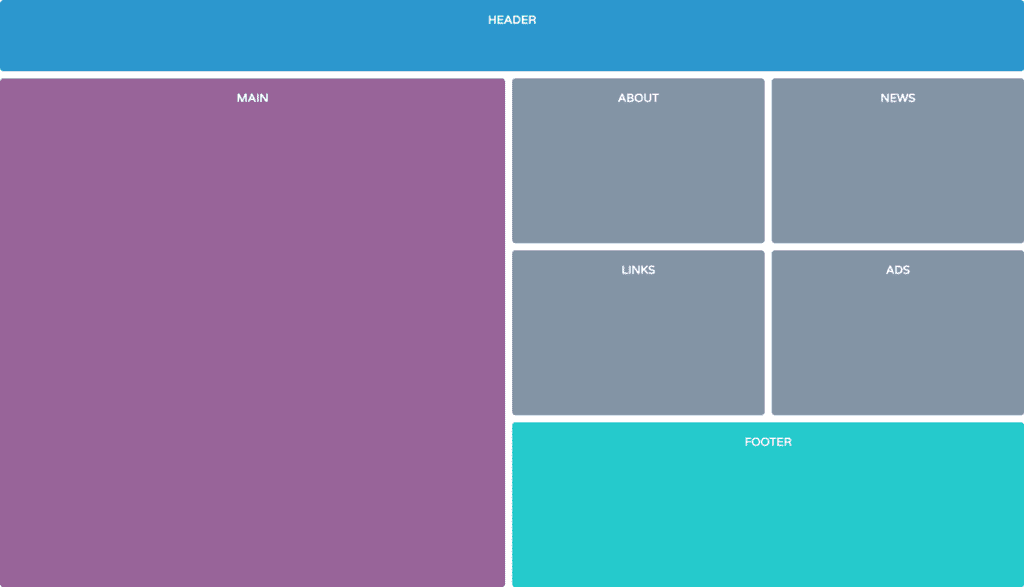
       - Use the image 'grid-template-areas.png' as a reference
   */
   grid-template-areas:
     "head head head"
     "main about news"
     "main links ads"
     "main foot foot";
 }
